Lesson 1: Your first script
ScriptFTP is a script-driven FTP client. It works like traditional FTP clients but does not require any user interaction while running, instead it works automatically using a text file which contains the actions ScriptFTP has to execute. Let us consider a simple script:
OPENHOST("ftp.myhost.com","myuser","mypassword")
GETFILE("myfile.zip")
CLOSEHOST
Click on New → Empty Script, paste the above script into the notepad and replace “ftp.myhost.com”, “myuser” and “mypassword” with your settings.
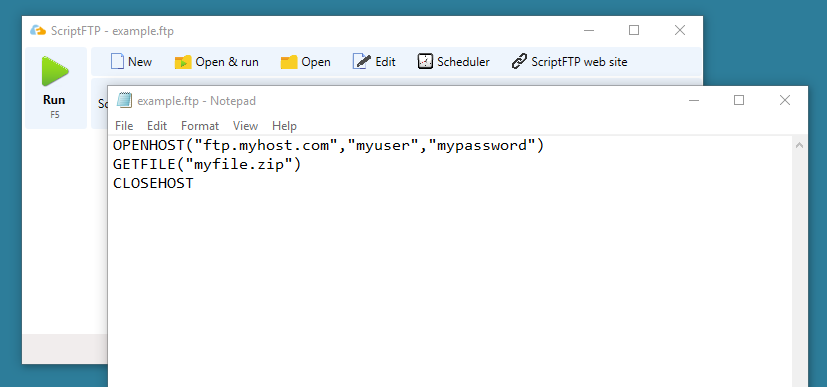
Now click RUN in the ScriptFTP window. Do not forget to save your modifications in the editor window first.
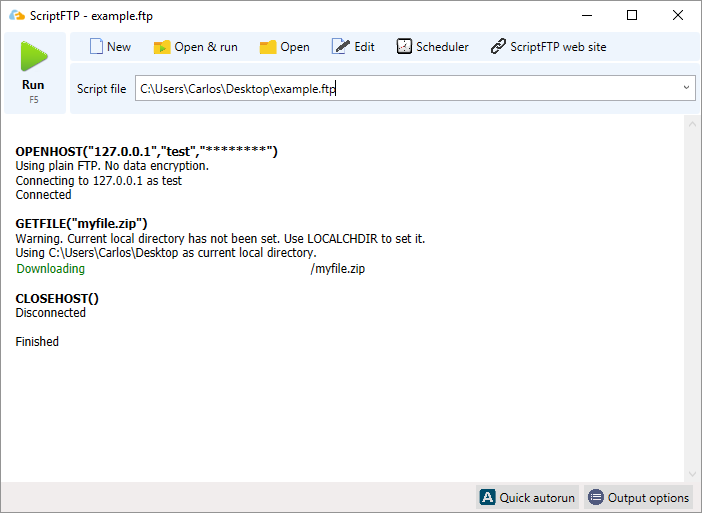
As you can see this script connects to the FTP server, downloads a file and then disconnects. It is a fairly simple script.
In order to familiarize yourself with the commands supported by ScriptFTP take a look at the command list. You may also take a look at GETFILE, PUTFILE or OPENHOST.
Lesson 1 has finished now. However, before moving on to the next lesson take a look at the script examples section on the ScriptFTP homepage. There you will find a collection of scripts for various purposes.
Next Lesson: Transferring files