The professional tool to automate FTP and secure FTP transfers    
Automated FTP & Batch FTP    


Scripting guide of the old version (1.4) 
GET STARTED
     Lesson 1: Your first script
     Lesson 2: Transfering files
     Lesson 3: Variables
     Lesson 4: IF, WHILE,GOTO
GUIDES
     Transfering only modified files
     How to make a backup
     Logging ScriptFTP messages
     Sending e-mails from the script
     Error Handling
     ScriptFTP in the command line
     Updating v1.4 scripts
     Encoding script files
COMMANDS
     Full command list
     Server connection
         OPENHOST
         CLOSEHOST
         SETPROTOCOL
         SETPORT
         SETTYPE
         SETPASSIVE
         SETSPEED
     File Transfer
         GETFILE
         PUTFILE
         SYNC
         TIMEDIFF
         ADDEXCLUSION
         CLEAREXCLUSION
     Directory handling
         LOCALCHDIR
         LOCALCWDIR
         LOCALMKDIR
         LOCALRMDIR
         CHDIR
         CWDIR
         MKDIR
         RMDIR
     File handling
         RENAMEFILE
         DELETEFILE
         LIST
         CHMOD
         Tip: Handling local files
         Tip: Moving remote files
     Script output
         PRINT
         SILENT
         LOGTO
     Miscellaneous
         CONCAT
         TIMEDIFF
         ISEQUAL
         ADD
         NOT
         SLEEP
         EXEC
         EXIT
         GETDATE
         GETENV
         GETPARAM
Lesson 1: Your first script


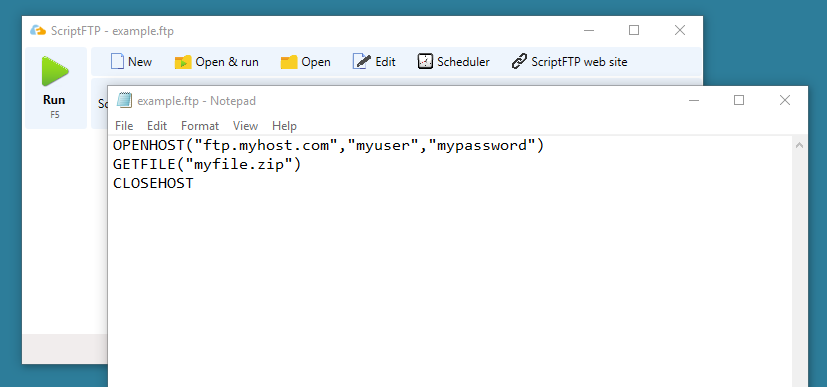
ScriptFTP is a script driven FTP client. It works like traditional FTP clients but it does not require user interaction to run, it works automatically using a text file containing the actions that ScriptFTP have to execute. Let's see a simple script:

OPENHOST("ftp.myhost.com","myuser","mypassword")
GETFILE("myfile.zip")
CLOSEHOST


Click on File->New -> Empty Script   and copy the above script replacing "ftp.myhost.com" , "myuser" and "mypassword" with your settings.


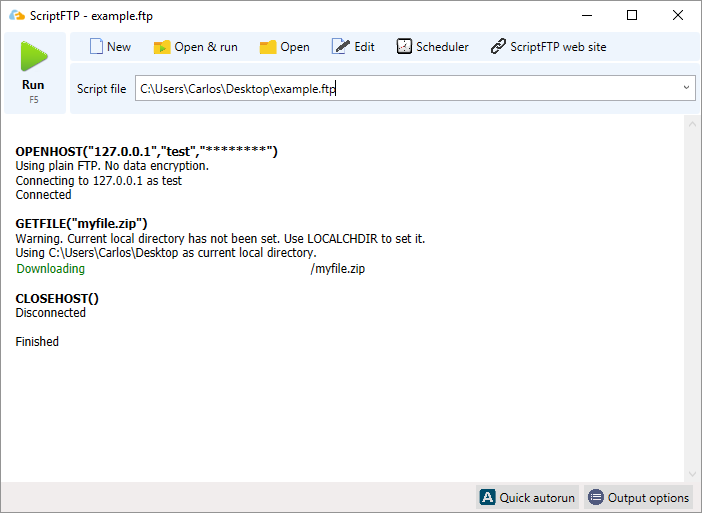
Now, click RUN on the ScriptFTP window. Remember to save the modifications you've done on the notepad before clicking run.


As you can see this script connects to the FTP server, downloads a file and disconnects. It's a fairly simple script.

To familiarize yourself with the commands supported by ScriptFTP take a look at the Full command list. You may also take a look at GETFILE, PUTFILE or OPENHOST.


The Lesson 1 has finished, before going to the next Lesson, take a look at the script examples section at the ScriptFTP homepage.There, you will find a collection of scripts for different purposes.


Next Lesson: Transfering files


Copyright 2004-2007 ScriptFTP software
[Contact]  [About]  [PAD file]
ScriptFTP software is a developer member
of the Association of Shareware professionals